AI Photo Generator vs Shrinkpad
Side-by-side comparison to help you choose the right tool.

AI Photo Generator
Create stunning, realistic AI photos from text or your own images for free, no experience needed.
Last updated: March 11, 2026

Shrinkpad
Shrinkpad quickly compresses your images and videos on Mac to save space and time.
Last updated: February 28, 2026
Visual Comparison
AI Photo Generator

Shrinkpad
Feature Comparison
AI Photo Generator
Ultra-Fast Text-to-Image Generation
Describe anything you can imagine using natural language, and watch as the AI brings it to life in seconds. Our platform is optimized for speed, using powerful cloud architecture to deliver your generated images almost instantly. You can quickly iterate on prompts, generate multiple variants for A/B testing, and find the perfect visual without long waiting times. It's perfect for when inspiration strikes and you need to see your idea visualized right away.
Powerful Image-to-Image Editing
Go beyond text by uploading your own photos as a starting point. This feature allows you to transform any image by applying new styles, changing backgrounds, adjusting moods, or altering compositions using simple text instructions. Turn a casual selfie into a professional headshot, reimagine a product in a different setting, or apply an artistic filter—all while maintaining the core structure of your original photo for consistency.
Vast Library of Styles and Models
Choose from a wide selection of AI models and artistic styles to match your specific project needs. Whether you require ultra-realistic photography for a product ad, an anime aesthetic for a personal project, a classic oil painting look, or a futuristic 3D render, the platform has a preset for it. This library gives you precise control over the final output's look and feel, ensuring the generated image aligns perfectly with your creative vision.
Commercial-Grade Output and High-Res Exports
Every image you create is generated with commercial use in mind. You receive high-resolution files that are ready to be used across websites, social media, print materials, and advertising campaigns. The AI is fine-tuned to understand realistic lighting, material details, and composition, resulting in professional-quality assets that you can confidently use in your business or personal branding without worrying about copyright issues.
Shrinkpad
Smart Batch Compression
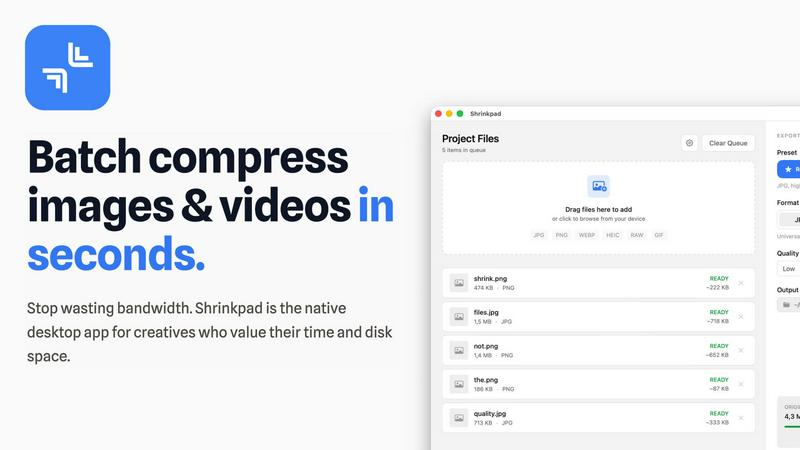
Shrinkpad makes handling large projects effortless with its powerful batch processing. You can drag and drop thousands of images and videos at once, and the app will process them all in a single queue. It automatically analyzes each file's visual complexity to apply the perfect compression ratio, aiming to reduce size without creating noticeable artifacts. This means you can compress an entire project's assets in minutes, not hours, saving you from the tedious work of optimizing files one by one.
Intelligent Folder Mode
Stop dragging files individually. With Folder Mode, you simply drop any folder onto Shrinkpad, and it instantly scans and detects all supported media files inside, including those in subfolders. It smartly identifies over 30 image formats (including RAW files) and all major video formats, adding them to your batch list while safely ignoring non-media files. This feature is perfect for organizing and optimizing exported assets from tools like Figma or Photoshop in one fell swoop.
Privacy-First Local Processing
Your files are your business. Shrinkpad ensures complete privacy by performing all compression work directly on your Mac. Nothing is ever uploaded to the cloud. This not only keeps your sensitive client work or personal projects secure but also means the process is lightning-fast, unhindered by your internet upload speed. You get powerful optimization without ever sacrificing control over your data.
Pro-Grade Format Support
Shrinkpad is built to handle the real-world mix of files that creatives use daily. It supports a wide array of formats out of the box, including JPG, PNG, WEBP, AVIF, HEIC, MP4, and MOV. You can even process images and videos together in the same batch. The app is fully optimized for Apple Silicon Macs, using multi-threaded compression to deliver blazing-fast performance and help you reclaim disk space efficiently.
Use Cases
AI Photo Generator
Social Media and Content Creation
Easily generate unique, eye-catching thumbnails, story graphics, and post images for platforms like YouTube, Instagram, and TikTok. Overcome creative block by quickly producing a stream of fresh, copyright-free visual content that engages your audience and strengthens your brand's online presence, all without needing a designer on standby.
Marketing and Advertising Visuals
Create stunning visuals for digital ads, website banners, email campaigns, and product presentations on a tight budget. Quickly prototype different concepts for A/B testing, visualize new products before a photoshoot, and produce a cohesive library of branded imagery that captures your campaign's message and appeals to your target customers.
Professional Portraits and Personal Branding
Generate profile-ready headshots and character-consistent portraits for LinkedIn, company websites, or professional bios. This is ideal for remote teams, entrepreneurs, and freelancers who need a polished, consistent online identity without the cost and hassle of scheduling a professional photography session.
Creative Projects and Concept Art
Bring your stories, game ideas, or interior design concepts to life. Writers can visualize characters and scenes, game developers can mock up assets, and designers can experiment with aesthetic moods. It's a powerful brainstorming tool that helps you explore and communicate creative ideas visually before committing to final production.
Shrinkpad
Web Designers & Developers
If you're building a website or app, large images and videos are the biggest culprits for slow load times. Shrinkpad helps you quickly optimize all your visual assets in bulk, significantly reducing bundle sizes. This leads to faster website performance and improved user experience, with many users seeing better Lighthouse scores. It's the perfect final step before deploying your project.
Photographers & Content Creators
Modern cameras and phones create massive files. Shrinkpad is ideal for photographers who need to archive hundreds of high-resolution shots or content creators managing gigabytes of video footage. You can compress your media library to save vast amounts of storage space while preserving the quality needed for portfolios, client delivery, or social media, all without ever uploading private content online.
Designers Preparing Assets
Designers often export assets at 2x or 4x resolution for various uses, resulting in unnecessarily large files. Instead of manually re-exporting from Figma, Sketch, or Photoshop, you can export everything at full size and let Shrinkpad handle the bulk optimization and renaming. This saves hours of repetitive busywork, ensuring your project files are lean and organized.
Teams & Small Studios
For teams collaborating on projects, sharing large asset folders can be a bandwidth nightmare. Shrinkpad's Team license allows multiple users to quickly optimize files before sharing them via email, cloud storage, or project management tools. This streamlines collaboration, saves on storage costs, and keeps everyone's local drives clutter-free.
Overview
About AI Photo Generator
AI Photo Generator is your creative companion that transforms your imagination into stunning visual reality. It's an easy-to-use online platform that leverages cutting-edge artificial intelligence to create professional-grade images from simple text descriptions or by editing your existing photos. The core idea is simple: you shouldn't need to be a graphic designer or a photographer to create amazing visuals. Whether you're dreaming up a fantasy landscape, need a new profile picture, or want to visualize a product concept, this tool makes it possible in seconds. It's built for everyone from complete beginners exploring digital art for the first time to marketers and content creators who need fast, high-quality assets. With a free plan to start, you can experiment without pressure, turning your words and ideas into photorealistic portraits, vibrant artwork, or compelling marketing graphics with just a few clicks. It's all about removing technical barriers and putting the power of advanced AI image generation right at your fingertips.
About Shrinkpad
Shrinkpad is your all-in-one desktop solution for quickly and easily reducing the size of your photos and videos, right on your Mac. If you're tired of large media files eating up your precious storage space or slowing down your website, this app is for you. It's designed to be incredibly simple: just drag and drop your files—or even entire folders—into the app, choose your settings, and let Shrinkpad compress them in seconds. The best part? Everything happens locally on your computer. Your files are never uploaded to the cloud, which means complete privacy for your work and no waiting for slow internet connections. Whether you're a photographer with hundreds of high-res shots, a designer preparing assets for a project, or a content creator managing lots of video clips, Shrinkpad helps you save gigabytes of space while keeping the visual quality you need. It's the fast, private, and powerful way to optimize your media. It's the native desktop app built for creatives who value their time, disk space, and the security of their work.
Frequently Asked Questions
AI Photo Generator FAQ
How do I start creating images?
Getting started is simple and free! Just visit the website and you can begin immediately. For a text-to-image, type a detailed description of what you want to see into the "Generate from Text" box and click generate. To edit a photo, use the "Edit My Photo" option to upload your image and then describe the changes you want to make. The platform guides you through each step.
Do I own the images I generate?
Yes, you own the images you create using AI Photo Generator. The platform is designed for commercial use, meaning you can freely use the generated photos in your business projects, social media, marketing materials, and even sell them as part of your products, provided they adhere to the platform's acceptable use policy.
What's the difference between the Text and Image workflows?
The Text-to-Image path is for creating completely new images from your imagination using only words. The Image-to-Image path is for editing or transforming an existing photo you upload; you use text to instruct the AI on what specific changes to make, like altering the style, setting, or colors while keeping the base composition.
Is there a free plan?
Yes! AI Photo Generator offers a free-to-start plan that allows you to explore the tool's core capabilities. This is perfect for testing prompts, understanding how the AI works, and creating initial concepts. When you're ready to generate more images or access higher-resolution exports, you can explore the available paid plans for increased capacity.
Shrinkpad FAQ
Can I use Shrinkpad for free?
Yes! Shrinkpad offers a Free Starter plan that lets you try the core compression features at no cost. This plan allows you to process up to 10 files per batch, supports common formats like JPG and PNG, and has a maximum file size limit of 1GB. It's a great way to test the app and see how much space you can save before deciding to upgrade.
What file formats does Shrinkpad support?
Shrinkpad supports a wide range of image and video formats. For images, it handles JPG, PNG, WEBP, AVIF, HEIC, and even professional RAW camera formats. For video, it supports major formats like MP4 and MOV. The app automatically detects over 30 different media formats when you use Folder Mode.
Does Shrinkpad support video compression?
Absolutely! Shrinkpad isn't just for images. It fully supports compressing video files like MP4 and MOV. You can even mix images and videos in the same batch queue, and Shrinkpad will apply the optimal compression settings for each file type, helping you save huge amounts of space on large video clips.
Are my files uploaded to the cloud?
No, never. Privacy is a core principle of Shrinkpad. All processing happens 100% locally on your Mac. Your files are never sent to or stored on any external server. This ensures your sensitive work remains completely confidential and also makes the compression process very fast, as it doesn't depend on your internet connection.
Alternatives
AI Photo Generator Alternatives
AI Photo Generator is a popular tool in the image and photo category, designed to create digital art from text prompts or existing images. It makes advanced visual creation accessible to users of all skill levels, helping them bring their ideas to life quickly. People often look for alternatives for various reasons. This could be due to budget constraints, a need for different artistic styles, or a preference for a platform available on a specific device like a mobile app. Some users might require more advanced editing features or a different pricing structure that better fits their usage. When choosing an alternative, consider what matters most for your projects. Key factors include the quality and style of the images produced, the speed of generation, the cost, and how easy the platform is to use. It's also wise to check if the tool offers the specific features you need, like photo transformation or a particular art style library.
Shrinkpad Alternatives
Shrinkpad is a Mac application designed for image and video compression. It falls into the category of media optimization tools, helping users reduce file sizes directly on their computer without using the cloud. People often look for different tools for various reasons. Maybe they need a solution that works on Windows or a mobile device, or they are looking for a free option or a tool with more specialized editing features. It's a common and smart step to explore what else is available. When choosing a different tool, consider what's most important for your workflow. Key things to think about include whether the tool works on your operating system, if it handles batch processing, how it manages your privacy, and of course, your budget.