
About DeepRails
DeepRails is your essential AI reliability platform, designed to help developers and teams build trustworthy, production-ready AI systems. As large language models (LLMs) become part of real-world applications, a major challenge is their tendency to "hallucinate" or generate incorrect, misleading, or ungrounded information. DeepRails tackles this head-on as the only guardrails solution that doesn't just find these errors but actively fixes them. It acts like a quality control checkpoint for your AI, evaluating every output for factual correctness, grounding in source material, and logical consistency. This allows you to catch mistakes before they reach your users, giving you the confidence to ship AI features you can truly stand behind. Built for modern development pipelines, DeepRails is model-agnostic, integrates seamlessly with leading LLM providers, and offers automated remediation, custom metrics, and continuous improvement loops to ensure your AI behaves reliably over time. It's the kill-switch for AI hallucinations, built by AI engineers for AI engineers who refuse to ship AI that makes things up.
Features of DeepRails
Defend API - Real-Time Correction Engine
The Defend API is your real-time AI correction engine. It acts as a guardrail that sits between your LLM and your customer. For every piece of AI-generated content, it automatically scores the output against your configured metrics (like correctness or completeness). If a potential hallucination or error is detected above your set threshold, the API can automatically trigger a fix. It uses actions like "FixIt" to correct the output or "ReGen" to ask the LLM for a new, improved response before the faulty information ever reaches your end-user.
Expansive Library of Guardrail Metrics
DeepRails provides a comprehensive, ready-to-use library of guardrail metrics to precisely detect issues in AI outputs. You can choose from general-purpose metrics like "Correctness" for factual accuracy, "Completeness" for answering all parts of a query, and "Context Adherence" for RAG systems. Each metric provides a granular score from 0-100. The platform boasts industry-leading accuracy, with metrics like Correctness being 45% more accurate than alternatives like AWS Bedrock, giving you superior confidence in your evaluations.
Automated Remediation & Improvement Chains
Unlike simple detection tools, DeepRails provides automated actions to fix problems it finds. When a guardrail is triggered, you can configure workflows to automatically correct the output. The platform logs every step of this "improvement chain," creating a full audit trail. You can see the original flawed output, the evaluation scores, and the final corrected response that was sent to the user. This turns error detection into an active quality improvement process.
DeepRails Console for Analytics & Auditing
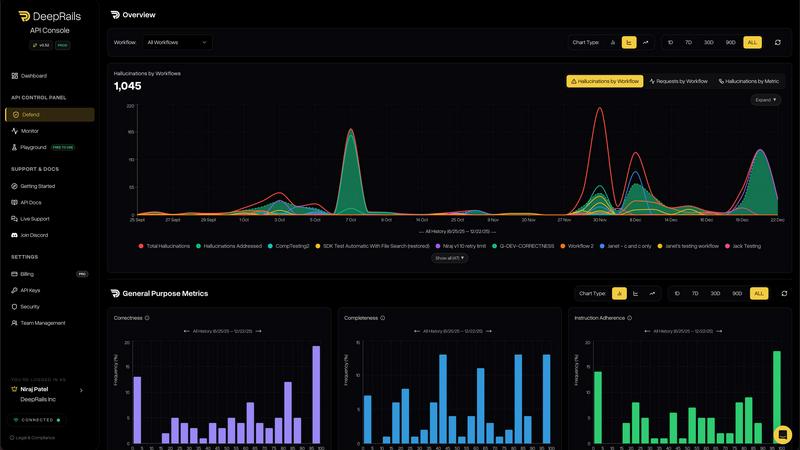
The DeepRails Console gives you full visibility into your AI's performance. Every interaction that flows through the Defend API is logged in real-time into beautiful dashboards and detailed traces. You can track key metrics like hallucinations caught and fixed, view score distributions for correctness and safety, and drill into any individual run to see the complete audit log. This console is built for engineers to monitor, debug, and continuously improve their AI systems over time.
Use Cases of DeepRails
Legal and Compliance Applications
In legal tech, accuracy is non-negotiable. DeepRails ensures AI legal assistants or research tools generate reliable information. It can verify case citations, check that legal advice is grounded in provided context, and prevent the AI from inventing non-existent laws or rulings. This protects firms from malpractice risks and builds user trust in AI-powered legal support, making it safe to deploy in sensitive domains.
Financial Services and Advisory
For fintech apps providing financial summaries, investment explanations, or personalized advice, DeepRails is critical. It guards against hallucinations by ensuring all numerical data, market summaries, and regulatory information are factually correct and complete. This prevents the AI from giving misleading financial guidance, helping companies comply with regulations and maintain their reputation for reliable information.
Healthcare and Patient Support
AI in healthcare must be safe and accurate. DeepRails can monitor chatbots or symptom checkers to verify that medical information, drug interaction lists, or treatment explanations are correct and adhere strictly to provided, vetted medical context. It filters out ungrounded claims, protecting patients from harmful misinformation and helping healthcare providers deploy supportive AI tools with confidence.
Robust RAG (Retrieval-Augmented Generation) Systems
For any application using RAG to ground AI answers in company documents, DeepRails' "Context Adherence" metric is essential. It checks every factual claim in the AI's output to ensure it is directly supported by the retrieved source material. This prevents the LLM from ignoring your documents and "going rogue" with its own knowledge, guaranteeing that your RAG system actually works as intended.
Frequently Asked Questions
What makes DeepRails different from other AI evaluation tools?
Most AI evaluation tools only detect problems. DeepRails is unique because it both detects and fixes hallucinations in real-time. While other tools might flag an incorrect output, DeepRails can automatically trigger a correction or a regeneration of the response before it reaches your user. It's an active guardrail, not just a monitoring system, designed to be integrated directly into your production workflow.
How easy is it to integrate DeepRails into my existing AI pipeline?
DeepRails is built for developers and integrates seamlessly. It is model-agnostic, meaning it works with any LLM provider (like OpenAI, Anthropic, etc.). You can typically integrate the Defend API by adding it as a middleware step in your API calls. The platform offers SDKs and clear API documentation to get you started quickly, allowing you to configure guardrail workflows and metrics in minutes.
Can I create custom guardrail metrics for my specific needs?
Yes, absolutely. While DeepRails offers an expansive library of pre-built, high-accuracy metrics for common needs like correctness and safety, it also allows you to build custom metrics tailored to your unique domain. This flexibility ensures you can evaluate very specific aspects of your AI's output that matter most to your business and your users.
What happens when DeepRails detects a hallucination?
When a hallucination or quality issue is detected above your configured threshold, the action you've predefined in your workflow triggers. Typically, this is either a "FixIt" action, where DeepRails attempts to correct the specific error in the text, or a "ReGen" action, where the system automatically sends the original prompt back to your LLM for a new, improved generation. The entire event is logged in the Console for your review.